Building a LLM Training Pipeline
Training pipeline demo (click to play, with commentary)
As part of digitising my bunnies AI Pet Part 2 series, I was manually training models which requires a lot of waiting. So I accidentally automated the process and after some AI sessions here we are.
This is a web app to take different base LLM models, train and evalutate them on multiple remote platforms. It can then dynamically load them for use in my projects on my own hardware.
It's a react app, with a Python API backend and Temporal workflow orchestration, running on my kubernetes cluster.
Why didn't I use unsloth, huggingface or a managed service for this? Because I was having too much fun shaving the yak and before I knew it I had an llm training pipeline. I also wanted to learn the full life cycle of LLMs on a deeper level.
The goal
Train multiple custom LLMs (cheaply), evalulate them, save them and load them dynamically to power my AI pet bunny, host it on my own hardware, and swap it into production without downtime.
Training Temporal Orchestration
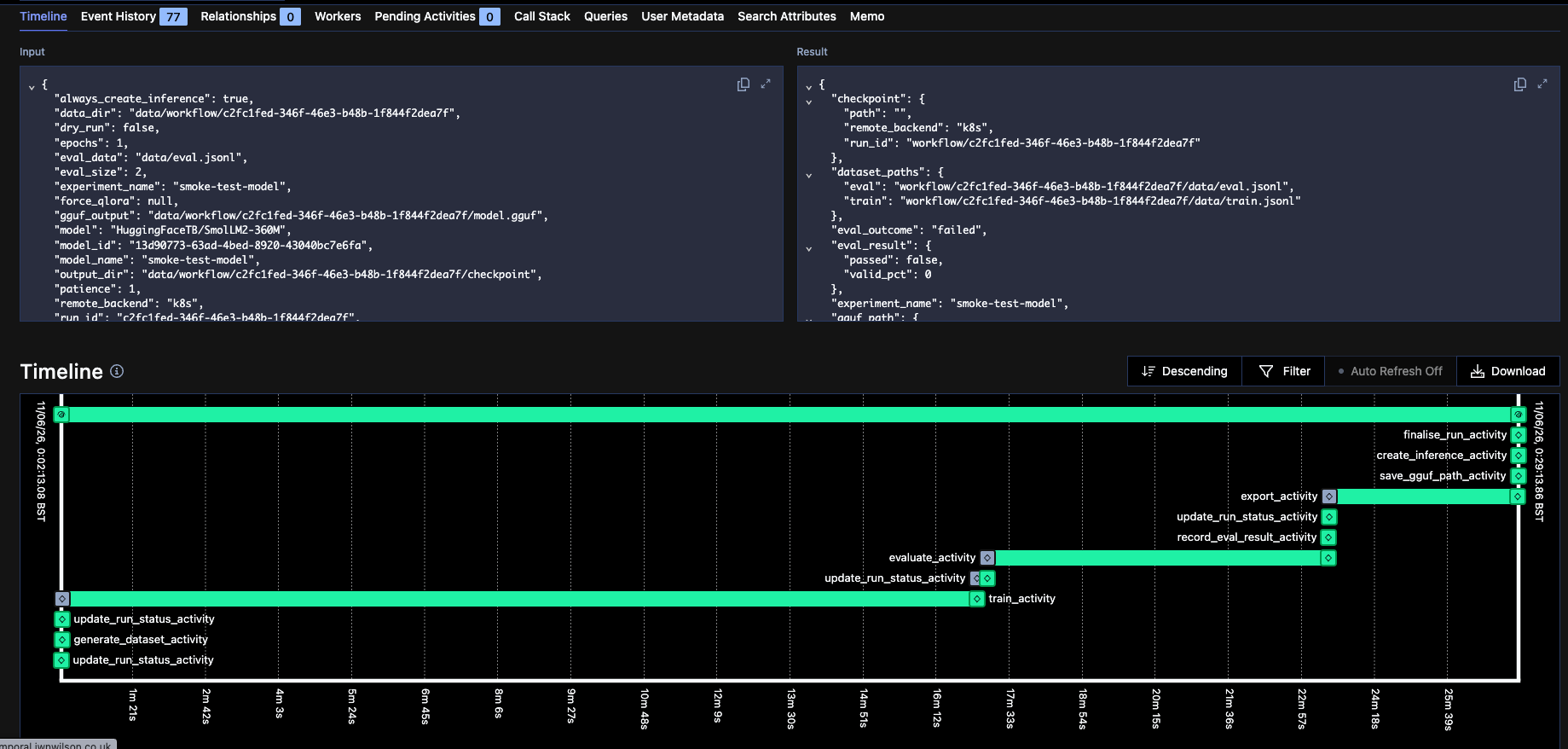
A training workflow running in Temporal
The core of this project is using Temporal to orchestrate the full workflow. My training workflow does the following:
- Data generation / loading of existing data
- Training / fine-tuning, saving checkpoints to blob storage (AWS S3)
- Evaluation of the trained weights with pass / fail
- Model file (GGUF) export and blob storage (AWS S3) upload
The cool part of this workflow is I can dynamically select which platform to use for each stage of the training process. If any stage fails, Temporal failure doesn't lose progress; the workflow just re-tries and re-connects to remote compute automatically.
Challenge: Waiting For Remote Compute — Long running tasks in temporal require heartbeats to indicate liveness, I had to ensure my remote training activities were sending these heartbeats back to Temporal. The activities trigger remote training then poll their status and sending heartbeats until completion.
Challenge: Avoiding duplicates on disconnect — If temporal fails or the heartbeat deadline is exceeded, it will re-try the activity which could trigger duplicate training runs. To solve this I generate a unique ID for each training run and pass that to the remote platform, then if the same ID is seen again it knows to re-attach to the existing run instead of starting a new one.
Orchestration Management
To manage this process I build the LLM API and UI, with this I can:
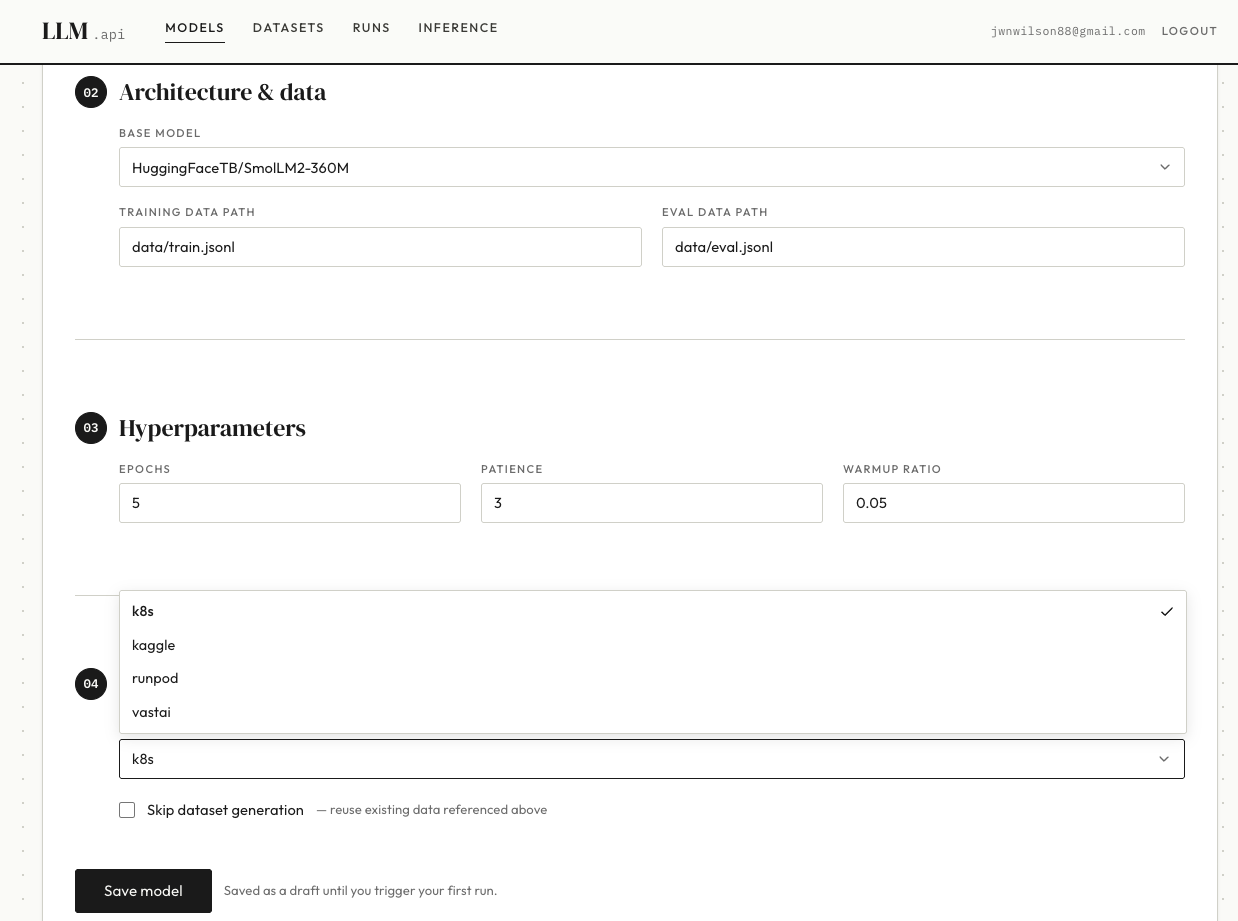
Selecting a base model in the LLM management UI
- Select which base model to use
- Select uploaded datasets and set training parameters
- Select remote compute to train on
- Trigger new training runs
- Monitor the progress
- Promote successful model training to load as inference models.
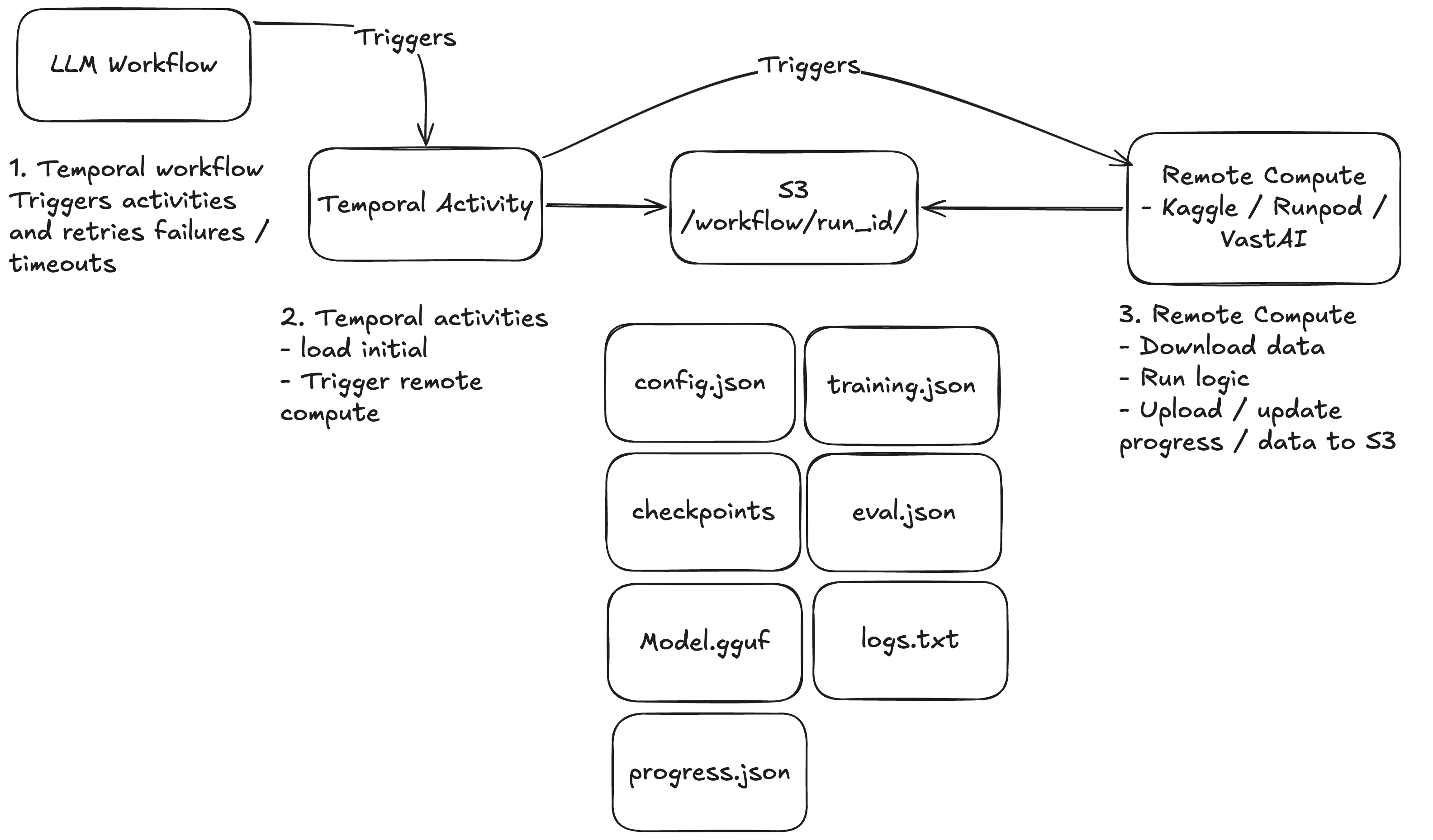
Currently communication between the remote compute and temporal workflow happens via files in AWS S3, temporal passes a run_id to remote worker. The remote worker then knows where it's input and output files should live in S3. It reads config, input data and it writes logs, progress reports and checkpoints back to S3 for the workflow to pick up. The UI can show these updates and receives server-sent events (SSE) from the API that tails those S3 writes and streams them to the UI in real time.
This is simple and has pros like not exhausting DB connections on parallel tasks, but it's not atomic and accidental overwrites are possible, the project will be need to manage this via LLM Service API calls to pool connections and be atomic in future.
Model size vs. accuracy — Getting a model accurate enough for simple bunny tasks while quantizing it down small enough to fit in the Pi's RAM required careful evaluation. I trained multiple variants and ran evals against a fixed benchmark — measuring per-stat accuracy, target-object selection, and action distribution — to find the right trade-off. A model that passes 95% accuracy on the eval suite gets promoted; anything below gets discarded and retrained with adjusted hyperparameters.
Remote Training Platforms

Remote training platforms used in this project
I quickly realised that raspberry pi's are not the best hardware for training LLMs, they took forever and got VERY hot (pictured). So instead I used them to orchestrate remote training on dedicated GPU platforms, that way I could learn how to train LLMs on bare metal and on remote machines where I can select the right hardware for the job.
The cheapest platforms for training LLMs I found where:
- Kaggle
- RunPod
- VastAI
- My own Kubernetes cluster
I skipped the main cloud providers (AWS, GCP etc) as they're the most reliable but also the most expensive. If I were to do this for a "real" project I'd probably look at keeping data within the cloud provider I'm using. LLMs and training require a lot of network bandwidth, one of the largest costs for this project was data egress.
Kaggle

Kaggle provides 30 hours of free training for non commercial use with decent hardware, I started here as it's very cost effective! The challenge is kaggle is designed to run notebooks, not containers and I had to use it creatively. I found is the best way to automate was package my logic in a library with a kaggle notebook that imports it, then using the Kaggle API to upload and trigger it.
Runpod

Runpod had a good balance of cost, consistency and automation potential, this ended up being the fastest / most reliable platform for me. I select a GPU, docker image with command and params, it will initialise that and start it. Only downside is that sometimes it runs out of available GPUs and my workflows fail.
VastAI

VastAI is interesting as it democratises GPUs allowing anyone to rent out their GPU, so it's the cheapest GPU provider and also the most unreliable. I almost gave up on using this platform due to the slowness and reliability but got it working well in the end. So now I use this for the slow, cheapest jobs and my opinion on this has definitely improved!
K3 pod

I want the ability to run all my logic on my own hardware for when I upgrade my local setup, this is currently slow as there's no GPU and limited but wanted to ensure it works!
Training workflow service reliability — Building a reliable, observable training orchestration service with Temporal meant designing for partial failures, platform timeouts, and cost limits across RunPod, Kaggle, and VastAI. Each platform has different error surfaces: Kaggle returns 500s when the notebook queue is full; RunPod pods can be preempted mid-training; VastAI instances occasionally fail to bootstrap. Temporal's retry semantics absorb most of this, but you still need activity-level error handling to distinguish a retryable network error from a genuine training failure.
Running Models
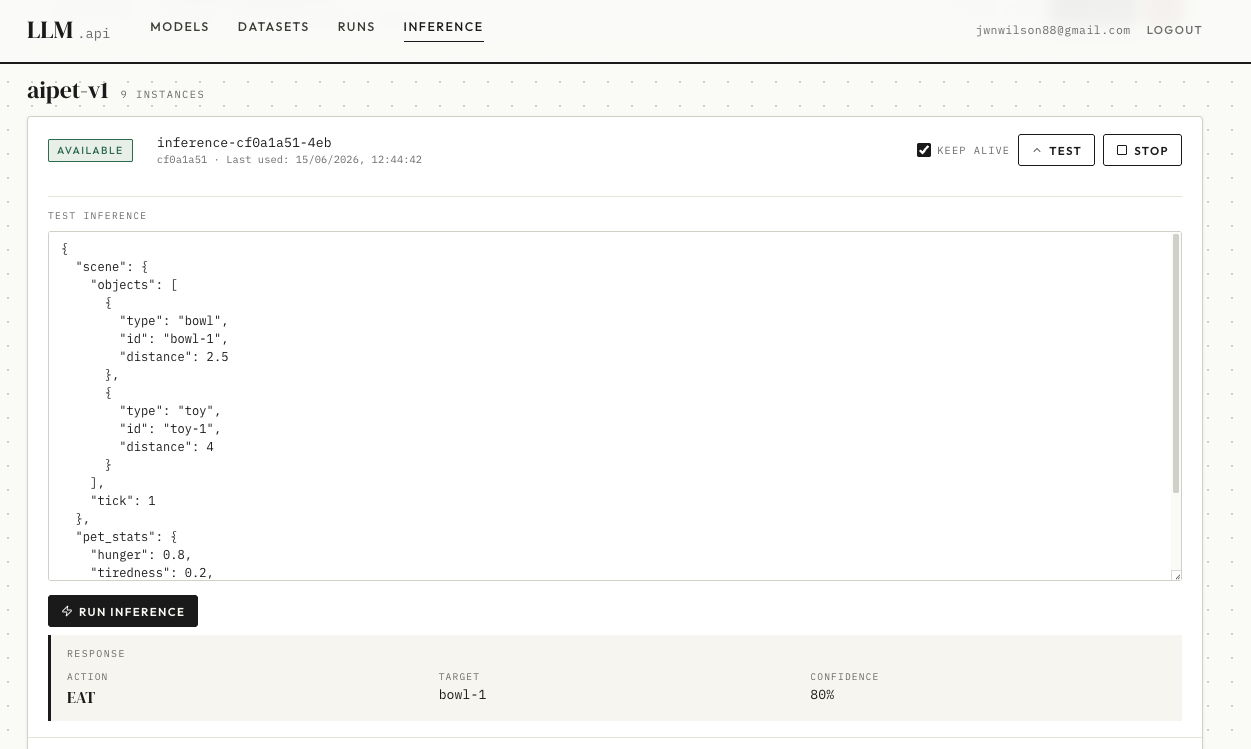
Running Created Models
Now I have trained models I wanted to make starting and testing them easy. I am currently running my models on Kubernetes so I can take advantage of that API to dynamically start pods and give them an internal DNS. If I start an "Inference" on my llm webapp the llm service will request a new pod loading the trained weights. It will monitor this pod and when it is available can proxy requests to it. So now my LLM Services can access it via my private network!
All access is managed via my LLM Service API, it has Oauth2 enabled for all public requests. This ensures I can control who and what makes requests to my LLMs.
Deliberate design / Automated testing
I used AI to build this project, the scope was ambitious and in order to make progress on multiple platforms I needed a few key things:
- A well structured project using SOLID principals and layered architecture
- Good instructions for the AI in architecture.md files, specs and design .md files
- TTD first approach to avoid AI faking tests for false confidence.
- A fast CI/CD deployment pipeline so the AI could validate it's changes quickly
- Robust Automated tests and E2E tests on a deployed system to validate changes
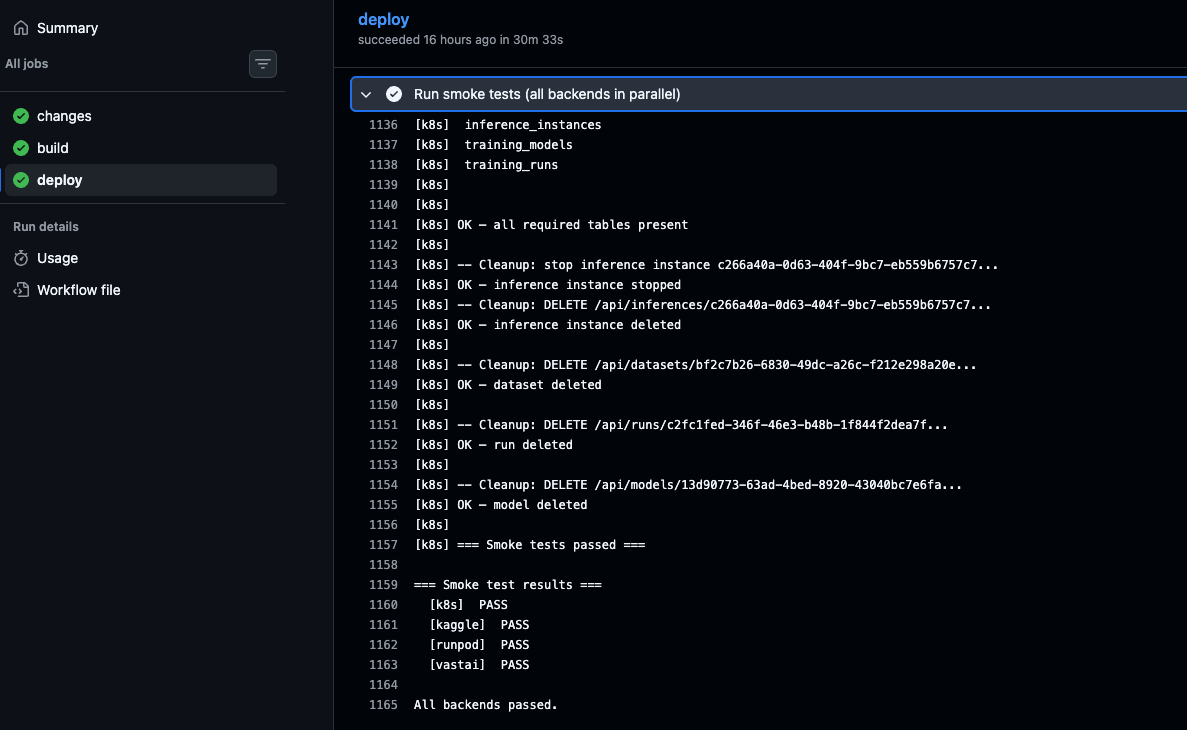
Automated tests and E2E checks running in CI
This allowed me to iterate and valiadate changes rapidly, I could kick off an experiment / bug fix on claude while I focused on another part of the project. AI could then validate it's changes or report they weren't successful, once I was able to elimiate false positives I got a large productivity boost.
I'll cover this more in a follow up post but this was essential for quickly verifying new logic and avoiding constant regressions.
Result And Next Steps

I think I did a god job!
This project covers the entire LLM lifecycle and I've been able to generate models that I'm using in a project. That's a win for me!
There are so many opportunities for next steps, I'm thinking of creating a data generation functionality to make distillation training easier using 3rd party LLMs. LLM training is all about preparing good training and eval data!
Other improvements will depend on what hardware I can get, as I've masterfully timed building this with all time highs in GPU and computing costs. Hopefully this knowledge will help me optimise systems and reduce costs during this time!
What do you think? Would love to hear your thoughts. :)
Project Code
The full source for the training pipeline service is available on GitHub: jwnwilson/llm_training_service.